
Close Menu
NERDBOT
    Facebook X (Twitter) Instagram YouTube
    Subscribe
    NERDBOT
    • News
      • Reviews
    • Movies & TV
    • Comics
    • Gaming
    • Collectibles
    • Science & Tech
    • Culture
    • Nerd Voices
    • About Us
      • Join the Team at Nerdbot
    NERDBOT
    Home»Technology»How to Run An Old Laptop with a Light Operating System
    Howard Bouchevereau on Unsplash
    Technology

    How to Run An Old Laptop with a Light Operating System

    Nerd VoicesBy Nerd VoicesNovember 1, 20194 Mins Read
    Share
    Facebook Twitter Pinterest Reddit WhatsApp Email

    You may probably wonder what to do with your old and antiquated laptop which is gathering dust in your closet. Usually, old  PCs cannot smoothly run modern operating systems and in some cases, you cannot install an operating system on an old laptop if the minimum system requirements are not met. Your old laptop may fall into either category since modern operating systems and applications require PCs with more computational power. But don’t throw in the towel yet. Thankfully, you can breathe life to your old laptop by installing some lightweight Linux distributions which will work perfectly well and will not consume much of your old laptop’s resources.

    In this article, we explore some lightweight Linux distributions that you can use on your old laptop.

    Puppy Linux
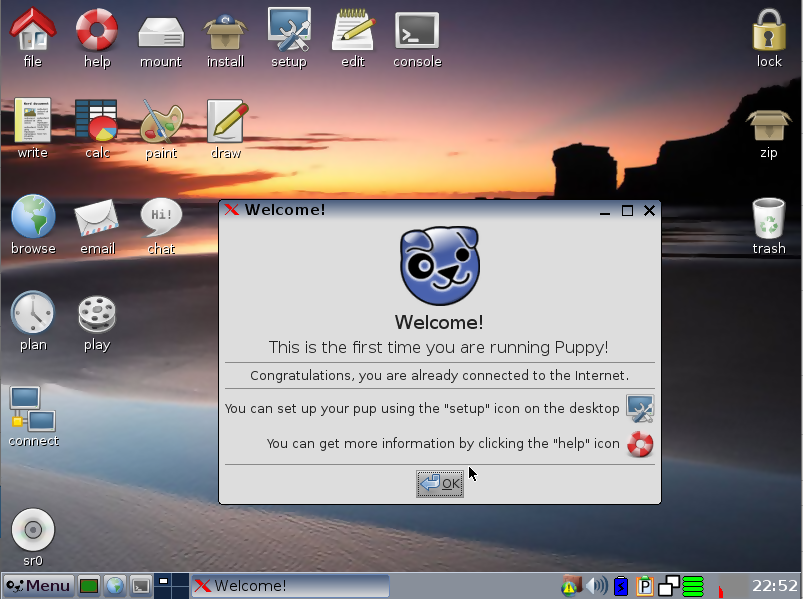
    Puppy Linux is a very lightweight Linux distribution renowned for its small memory footprint and the ability to run efficiently with very minimal system requirements. The ISO image download is only 128 MB. Additionally, Puppy Linux can be booted right from a CD or bootable flash drive. Puppy Linux is not based on any Linux system. It’s an aggregation of other distros such as Arch Linux, Ubuntu, and Slackware. Furthermore, Puppy is quite customizable and allows the user to make a few tweaks here and there. It’s also fast and stable. However, being a very lightweight distribution, it falls short of the aesthetic appeal that you would find in distributions such as modern versions of Ubuntu, RHEL, CentOS, and Fedora. Puppy Linux is one Linux distribution that you would certainly want to try out on your old laptop.

    Linux Lite
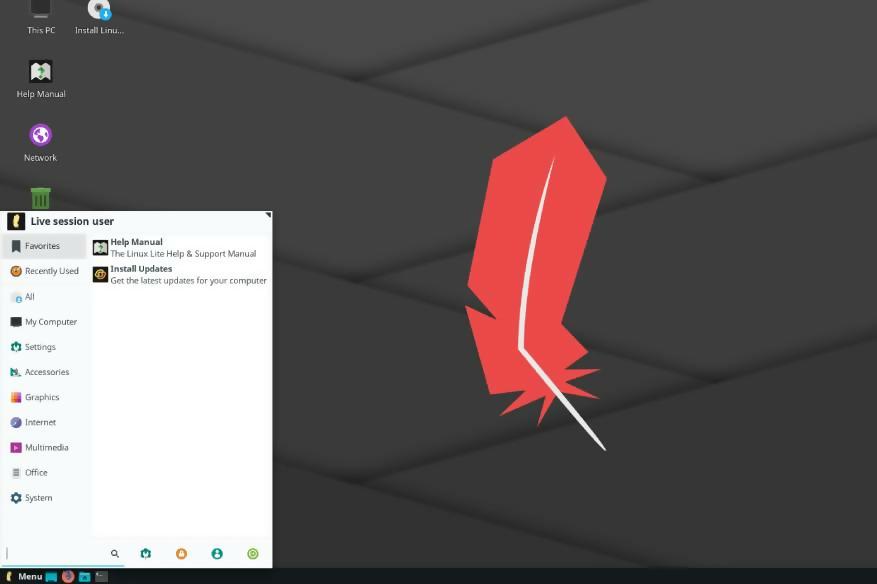
    Based on Ubuntu, Linux Lite is a lightweight and easy-to-use Linux flavor that was primarily designed for those seeking to migrate from Windows to Linux. It comes with an intuitive desktop environment, and familiar software applications such as Firefox browser, Spotify, Skype, Kodi, LibreOffice and Thunderbird email client. With Linux Lite, you can get started out of the box without having to install extra software applications. This is something has makes it ideal for running on old PC systems especially those with RAM of less than 1 GB , CPU of 1.5 GHz and hard disk space of only 10 GB.

    Lubuntu

    Lubuntu is yet another lightweight, stable, fast and easy-to-use Linux distribution based on Ubuntu. It operates with impeccable efficiency with minimal system resources. Lubuntu ships with a lightweight desktop environment known as LXDE which consumes less RAM and CPU resources compared to the GNOME environment in Ubuntu 17.10 and later versions. You can get started with only a RAM of 1 GB, and a Pentium processor or AMD K8. Additionally, it ships quintessential applications for daily use such as LibreOffice suite, video, and music player, image editor, PDF reader, and  Thunderbird email client, to mention just but a few. You can give your old PC, or Raspberry Pi device some new lease of life with Lubuntu and be sure that it will work flawlessly without putting a strain on the available system resources. 

     Zorin OS
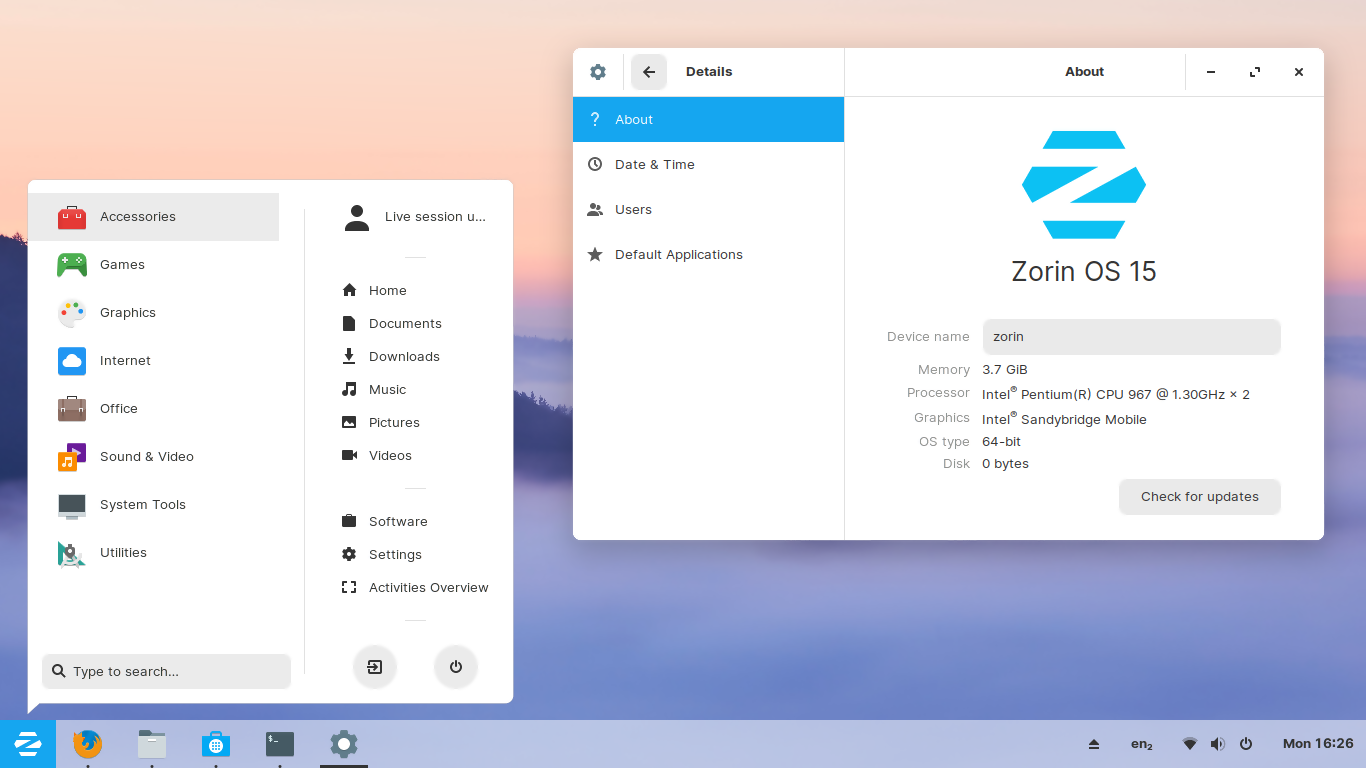
    Zorin is an ideal alternative to Windows and macOS. It comes with an intuitive, user-friendly desktop that is ideal for newcomers transitioning to Linux and who would still prefer to retain the look and feel of a Windows desktop. It ships with handy utilities and applications such as LibreOffice suite, Evolution and Thunderbird email clients, Audacity media player, Firefox browser, GIMP image editor, Skype, Wine, and VLC media player. You can get started with an old PC with 512 MB RAM, 1 GHz CPU and just 5GB of free hard disk space.

    Windows XP

    If Linux is not your cup of tea, then the good old Windows XP will come in handy for your old laptop PC. With just 192 MB of RAM, 300 MHZ processor and 1.5 GB of free hard disk space, you are good to go. It may not support modern applications such as Google Chrome, Adobe PDf reader and media players but it can help you achieve a few tasks on your old PC.

    Article Submitted by Jeff M Thomas
    Cover image by Pexels

    Do You Want to Know More?

    Share. Facebook Twitter Pinterest LinkedIn WhatsApp Reddit Email
    Previous ArticleMy Chemical Romance Return Tickets on Sale Today
    Next Article RAZER Releasing Official Pikachu Mouse and Keyboard
    Nerd Voices

    Here at Nerdbot we are always looking for fresh takes on anything people love with a focus on television, comics, movies, animation, video games and more. If you feel passionate about something or love to be the person to get the word of nerd out to the public, we want to hear from you!

    Related Posts

    Digital Signage Software for Multi-Location Businesses and Franchises

    February 6, 2026

    Under Vehicle Scanning System Price: Complete Buyer Guide & UVSS Solutions

    February 6, 2026

    Find Remote Jobs in 2026: A Complete Step-by-Step Guide

    February 5, 2026

    How to Combine Free Video Makers with AI Tools for Unique Content

    February 5, 2026
    best payment gateway

    TELEPASS E-PAY Limited Streamlines Payment Operations for Digital Platforms

    February 5, 2026
    Why Real-Time Asset Visibility is the Most Important Tech Investment for 2026

    EU Ecology Services Ltd Aligns Sustainability Operations with Long-Term Business Stability

    February 5, 2026
    • Latest
    • News
    • Movies
    • TV
    • Reviews
    AvandaTimes: A Modern News Platform Redefining Digital Journalism

    How to Choose the Right Microsoft Licensing Partner for Your Cloud Strategy

    February 6, 2026

    Cymron Bancil’s Limitless Lifestyle Helps Executives Master Energy with Health Systems Built for the USA Market

    February 6, 2026
    Cultivating

    Cultivating a Culture of Cardiac Ready: The Human Ecosystem That Completes Your AED Program

    February 6, 2026
    Serhii Malyshev

    The Organic Algorithm: How Serhii Malyshev Is Reprogramming Retail to Feel Human Again

    February 6, 2026

    ZOA Energy Drink Honest Review

    February 5, 2026
    best payment gateway

    TELEPASS E-PAY Limited Streamlines Payment Operations for Digital Platforms

    February 5, 2026

    LEGO Teases Heart of the Bricks Yu-Gi-Oh! Contest

    February 4, 2026

    You Can Get Married at Disneyland’s Haunted Mansion!

    February 4, 2026

    LEGO Reveals Official “Project Hail Mary” Set, Rocky Minifig!

    February 5, 2026
    "The Texas Chain Saw Massacre," 1974

    A24 Planning “Texas Chainsaw Massacre” Series, Movie

    February 4, 2026

    The Last Sundance: The Good, The Bad, and The Horny

    February 3, 2026

    Meryl Streep to Play Joni Mitchell in Upcoming Biopic

    February 3, 2026

    Craig Mazin to Showrun “Baldur’s Gate” TV Series for HBO

    February 5, 2026

    Rounding Up “The Boyfriend” with Commentator Durian Lollobrigida [Interview]

    February 4, 2026

    “Saturday Night Live UK” Reveals Cast Members

    February 4, 2026

    Very Special “Doctor Who” Auction Kicks Off Today

    February 3, 2026

    “The AI Doc: Or How I Became an Apocaloptimist” Timely, Urgent, Funny [Review]

    January 28, 2026

    “The Gallerist” Campy, Fun, Cartoonish Look at Art, Artists [Review]

    January 27, 2026

    “The S**theads” Odd Couple Absurdist Road Trip from Hell [Review]

    January 25, 2026

    “I Want Your Sex” Sexy, Sleazy, Laugh Out Loud Funny [Review]

    January 25, 2026
    Check Out Our Latest
      • Product Reviews
      • Reviews
      • SDCC 2021
      • SDCC 2022
    Related Posts

    None found

    NERDBOT
    Facebook X (Twitter) Instagram YouTube
    Nerdbot is owned and operated by Nerds! If you have an idea for a story or a cool project send us a holler on [email protected]

    Type above and press Enter to search. Press Esc to cancel.