
Close Menu
NERDBOT
    Facebook X (Twitter) Instagram YouTube
    Subscribe
    NERDBOT
    • News
      • Reviews
    • Movies & TV
    • Comics
    • Gaming
    • Collectibles
    • Science & Tech
    • Culture
    • Nerd Voices
    • About Us
      • Join the Team at Nerdbot
    NERDBOT
    Home»Nerd Voices»NV Apps/Review»WonderFox HD Video Converter Factory Pro Review 2022
    NV Apps/Review

    WonderFox HD Video Converter Factory Pro Review 2022

    Nerd VoicesBy Nerd VoicesJune 21, 20223 Mins Read
    Share
    Facebook Twitter Pinterest Reddit WhatsApp Email

    Are you looking for an efficient video conversion tool? If so, you’ve come to the right place. While searching for converters, you must consider using reliable tools that meet your needs. 

    Fortunately, WonderFox HD Video Converter Factory Pro has the ability to convert videos to almost any format. It is a simple and easy video converter dedicated to helping users convert video to more than 500 output formats.

    Main features of WonderFox HD Video Converter Factory Pro

    WonderFox HD Video Converter Factory Pro comes with many functions to convert video formats and audio files and is compatible with Windows. We’ve tested many converters over the years, but this software is the only one that’s really practical and handy. Also, its clear interface makes use a breeze.

    Convert video and audio files to 500+ output formats

    What are its main features? Yes, as you can guess from its name it mainly converts multimedia file formats without quality loss. It even solves compatibility issues by converting audio and video files to over 500 output formats, such as WMV, AVI, MOV, VOB, M4V, 3GP, MTS, MPG, MP4, MTS, M2TS, DTS, WAV, OGG, FLAC, ALAC, MP3, etc.

    Compatible with mainstream devices

    Many times, video files cannot be uploaded and shared due to their compatibility. Surprisingly, WonderFox HD Video Converter Factory Pro is compatible with Windows 11/10/8/7 and lower and allows you to convert audio and video files to a variety of handheld and pendant devices, including tablets, laptops, desktops, TVs, phones and much more.

    A built-in video editor

    Besides audio and video file conversion, WonderFox HD Video Converter Factory Pro is also equipped with a basic video editor. Both beginners and advanced users can use it easily. This means that you can make necessary edits to the video before or after the conversion. Indeed, the built-in video editor has some great features to make your videos more unique like adding watermarks. 

    In addition, it also covers some common editing features including trimming, merging, cropping, rotating AVI videos and adding subtitles/audio tracks.

    Download videos from more than 300 video websites

    Another recommended feature is that WonderFox HD Video Converter Factory Pro is embedded with a fast video downloader that allows you to download videos from over 300 video sites for offline viewing, such as Vimeo, Vevo, YouTube, Hulu, Dailymotion, Liveleak, Facebook, Twitter and much more.

    Additional features of WonderFox HD Video Converter Factory Pro

    • Record the screen with sound.
    • Convert SD video to HD video.
    • Convert videos and pictures into GIF.
    • Extract audio from video files.
    • Add subtitles to videos.
    • Batch convert video files, up to 10 at a time.
    • Create unique ringtones for your device.

    How to convert videos with WonderFox HD Video Converter Factory Pro?

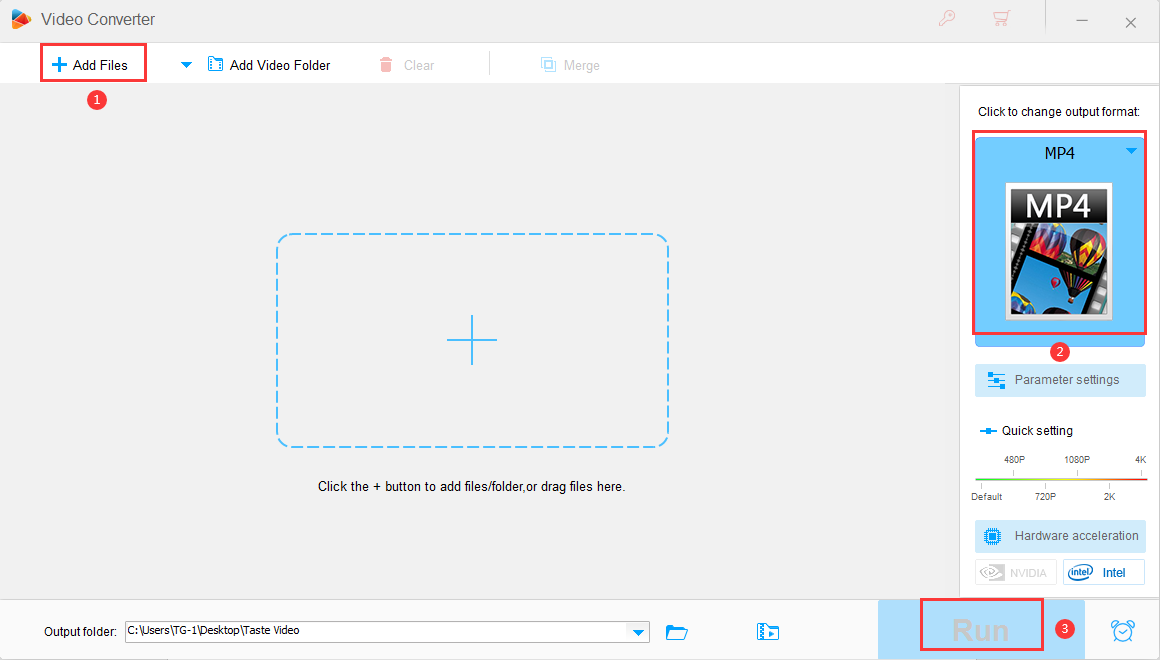
    Here are the simple steps to convert video format with WonderFox HD Video Converter Factory Pro.

    Step 1: Go to “Converter” and click “Add File” to load your video into the program.

    Step 2: Click the “Output Format” panel and select the desired format under the “Video” tab.

    Step 3: Click the “Run” button to start converting video files.
    Pros

    • User friendly.
    • Multiple gadgets in one.
    • Fast processing speed.
    • 0 quality loss.
    • Hundreds of output formats.

    Cons

    • Compatible with Windows only.

    Final words

    WonderFox HD Video Converter Factory Pro is a simple and practical conversion tool that not only helps you convert videos to various formats, but also provides a built-in video downloader and editor. What’s more, it’s Windows-compatible and available for users to try out, and offers great processing speed while in use. Finally, the simplicity of the interface makes it a must-have conversion tool for both beginners and advanced users.

    Do You Want to Know More?

    Share. Facebook Twitter Pinterest LinkedIn WhatsApp Reddit Email
    Previous Article5 Factors To Consider When Buying Apple Watch Band
    Next Article Fathom Events Releases Statement on “The Thing” Issue
    Nerd Voices

    Here at Nerdbot we are always looking for fresh takes on anything people love with a focus on television, comics, movies, animation, video games and more. If you feel passionate about something or love to be the person to get the word of nerd out to the public, we want to hear from you!

    Related Posts

    Exploring the Creative Possibilities with Uncrop AI

    Exploring the Creative Possibilities with Uncrop AI

    January 20, 2026
    Is SMMBUZ Best Site to Purchase Followers on Instagram?

    Is SMMBUZ Best Site to Purchase Followers on Instagram?

    January 17, 2026
    Maktun App Reviews: Is It Legit for Coin Value?

    Maktun App Reviews: Is It Legit for Coin Value?

    January 16, 2026
    NGC App Reviews: Is It Legit for Coin Value?

    NGC App Reviews: Is It Legit for Coin Value?

    January 16, 2026
    Numiis Coin Value App Reviews: Is It Legit?

    Numiis Coin Value App Reviews: Is It Legit?

    January 16, 2026
    PCGS CoinFacts App Reviews: Is It a Free Coin Identifier?

    PCGS CoinFacts App Reviews: Is It a Free Coin Identifier?

    January 16, 2026
    • Latest
    • News
    • Movies
    • TV
    • Reviews
    Digital Marketing ROI

    Unlocking the Power of Native Ads: A Comprehensive Guide to Boosting Digital Marketing ROI

    January 22, 2026
    Digital Road Charging

    Digital Road Charging in Czechia and Its Impact on Modern Travel Planning

    January 22, 2026
    Iraq

    10 Interesting Facts About Iraq Every Traveler Should Know

    January 22, 2026

    Apple TV’s “Drops of God” Decants Season 2 [Interview]

    January 22, 2026

    Apple TV’s “Drops of God” Decants Season 2 [Interview]

    January 22, 2026

    Flight Of The Conchords to Reunite at Netflix is a Joke Fest 2026

    January 20, 2026

    Former Nintendo of America Boss Doug Bowser Joins Hasbro

    January 20, 2026

    Going Ape with “Primate” Star Victoria Wyant [Interview]

    January 20, 2026

    “Masters of the Universe” Gets Official Teaser

    January 22, 2026

    “Sinners” Breaks Oscars Record with 16 Nominations

    January 22, 2026

    Kenan & Kel to “Meet Frankenstein” in New Project

    January 21, 2026

    “Masters of the Universe” Live-Action Gets 1st Tease

    January 21, 2026

    Apple TV’s “Drops of God” Decants Season 2 [Interview]

    January 22, 2026

    “Cobra Kai” Gets Full Series Physical Media Release

    January 22, 2026

    “For All Mankind” Season 5 Teaser, March Release Date

    January 21, 2026
    "Only Murders in the Building"

    Martin Short Documentary Hitting Netflix in May

    January 20, 2026

    Sundance Film Festival: 5 More Films to Watch in 2026

    January 16, 2026

    Sundance Film Festival 2026 Preview: 5 Films We Recommend

    January 15, 2026

    “Greenland 2: Migration” Solid Sequel, The Cost of Survival [Review]

    January 10, 2026

    “Primate” Lean, Mean, Gnarly Creature Feature [Review]

    January 5, 2026
    Check Out Our Latest
      • Product Reviews
      • Reviews
      • SDCC 2021
      • SDCC 2022
    Related Posts

    None found

    NERDBOT
    Facebook X (Twitter) Instagram YouTube
    Nerdbot is owned and operated by Nerds! If you have an idea for a story or a cool project send us a holler on [email protected]

    Type above and press Enter to search. Press Esc to cancel.