



A SaaS explainer video should answer a precise question at a precise point in the funnel. Awareness viewers need to recognize the problem. Evaluation viewers need to understand the mechanism and trust the product. New users need to reach first value. One video rarely performs all three jobs well. A source-driven Explainer Video Engine such as TapVid can turn existing creator content such as prompts, PDFs, product links, or scripts into a reviewable motion-graphics draft, but a durable SaaS video still needs approved claims, accountable review, and an update policy.
This guide is for SaaS marketers and product teams making a purchase or production decision. It covers funnel fit, source preparation, story structure, product proof, review gates, update triggers, distribution, and measurement without promising unsupported growth.
Give the SaaS Explainer Video One Funnel Job
Begin with the viewer’s state. What do they already believe, what prevents the next step, and what can one short video reasonably change?
An awareness video might explain why the old workflow creates friction. A consideration video might show how source content becomes structured scenes. A decision video might demonstrate product controls, output quality, and review. An onboarding video might guide one setup sequence. These assets can share footage and design rules, but they should not share an overloaded script.
Write the job as an observable transition: “A marketer who has an approved product brief but no motion-design workflow should understand how the brief becomes a reviewable explainer and know what to test next.” That sentence tells the writer what to include and what to cut.
Use a representative source during vendor or software evaluation. The documented TapVid test below used a fictional Northstar Labs brief. The output included a visible scene timeline, and a targeted revision moved two-factor authentication before Slack setup while retaining four requested actions, fictional data, a sixty-second format, and a 16:9 ratio. The test does not establish a general turnaround promise. It demonstrates a practical buying method: provide a realistic source, request a meaningful change, and inspect whether constraints remain visible.

Figure: A representative SaaS test should expose both source handling and revision control.
Prepare a Source Pack That the Team Can Approve
SaaS products accumulate conflicting copy across product pages, pitch decks, help articles, release notes, sales scripts, and internal documents. The video should not blend them without judgment. Create a small approved source pack before writing.
Include:
- The primary audience and use case
- The current positioning statement
- The buyer problem in observable language
- The product mechanism and critical workflow
- Approved interface captures or access to a stable environment
- Proof that may be used publicly
- Current offer and call to action
- Claims requiring legal or product review
- Terms, features, or screens that are scheduled to change
Label the canonical source for each fact. If the pricing page and sales deck conflict, assign an owner to resolve the conflict. Do not let the video team select the more convenient version.
The source pack also makes future maintenance easier. When a claim changes, the owner can trace which scenes depend on it. That is more reliable than watching the entire master and hoping someone notices every outdated detail.
Map the Video to the SaaS Funnel
Each funnel stage requires different evidence and a different next action.
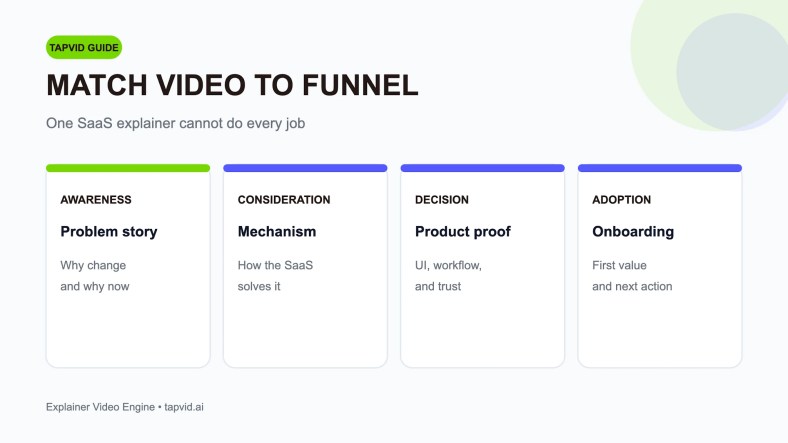
Awareness: explain the problem and why it matters
Use a recognizable situation, not a category lecture. Show the creator or marketer rebuilding the same explanation, chasing edits across files, or struggling to turn an approved brief into motion. The viewer should recognize the cost of the current method before hearing the product name.
The next action may be to see an example or learn how the approach works. Avoid forcing a detailed interface tour on a viewer who has not yet accepted the problem.
Consideration: explain the mechanism
Show the chain that makes the product distinct. For a source-driven video workflow, that might be source input, scene structure, motion generation, targeted refinement, and export. Keep the chain small enough to understand. The viewer does not need every control.
Mechanism scenes must remain factual. If the product accepts a PDF or link, show the current behavior. If a feature is on a roadmap, exclude it or mark it clearly in internal review. Public videos should not turn intent into present capability.
Decision: provide product proof
Decision-stage viewers need confidence that the workflow fits their standards. Show readable interface detail, a representative output, revision behavior, collaboration where supportable, and any constraints that affect purchase. Use real product evidence rather than decorative dashboards.
The next action may be a trial, demo, or test with the buyer’s own source. Match it to the sales motion. A self-serve product and an enterprise purchase should not end with the same call to action by default.
Adoption: guide first value
An onboarding explainer should help an existing user complete one meaningful task. It can be more procedural because the viewer has already chosen the product. Keep it synchronized with the product and help content. If the workflow changes, update the video or remove it before it creates support tickets.
Write a Story That Makes the Mechanism Credible
A practical SaaS story has five parts: buyer, friction, mechanism, proof, and action. The sequence can be compressed, but skipping the mechanism usually leaves a generic promise.
Start with one buyer and one situation. Describe the friction through actions the viewer recognizes. Introduce the product only when the viewer understands what must change. Then show the smallest mechanism that makes the promise plausible. Use proof appropriate to the claim, and finish with one next action.
Write narration in short spoken sentences. Place one idea in each scene. Keep interface labels consistent with the current product. Read the script aloud and remove lines that merely repeat the visual.
Maintain an internal claim sheet with the narration, visual job, source, and approver. Product should approve workflow accuracy. Brand should approve presentation and terminology. Legal should review claims that carry regulatory, contractual, or comparative risk. One accountable owner should combine their feedback.
Choose a Production Model for SaaS Content Velocity
The right model depends on message uncertainty, craft requirements, update frequency, and buyer capacity.
An agency is suitable when the company needs positioning support, original direction, specialist craft, and managed executive approval. A freelancer can suit a stable brief and one accountable marketer. An internal editor can work for straightforward, repeated product education when skills and time are available.
A source-driven Explainer Video Engine can suit teams that already create prompts, product pages, documents, and scripts and need repeatable output. Its value should be tested through source fidelity, scene structure, plain-language refinement, and maintainability. Review the actual result, not only the first generated draft.
A hybrid model can reserve custom direction for a flagship story while using modular internal production for feature education, variants, or updates. Define how source files, licenses, brand rules, and approvals move between participants.
Price the operating system, not just the first asset. Include buyer hours, product access, review, later updates, required tools, and publishing work. A low project fee may be expensive if every release requires a new vendor brief. A subscription may be poor value if the team cannot supply approved source material or review output.
Set Review Gates That Protect Product Truth
Use gates for the brief, script, storyboard, first cut, and master. State what becomes fixed at each gate. A script approval should lock the message and claims. A storyboard approval should lock scene logic. First-cut feedback should focus on motion, timing, legibility, accuracy, and final corrections, not a new positioning strategy.
Assign one decision owner. Product, brand, legal, sales, and customer success may all contribute, but the production team should receive one consolidated response. Ask reviewers to identify whether a comment concerns accuracy, risk, brand, comprehension, or preference. Accuracy and legal risk generally outrank taste.
Test a meaningful revision during selection. Move a workflow step, replace a claim, or update a scene using the same type of change your SaaS team expects after release. Count the external fee and the internal time. This reveals whether the workflow can support your release rhythm.
Set Update Triggers Before the Video Ships
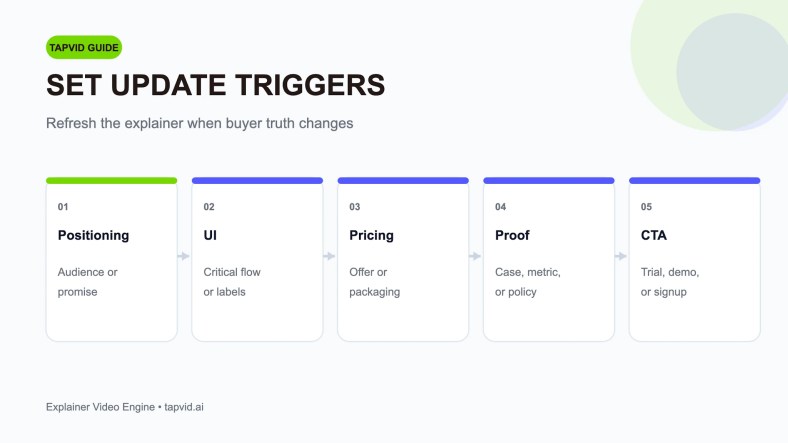
A SaaS explainer starts aging as soon as the product or offer changes. Define events that require review and events that require immediate replacement.
Common triggers include:
- Positioning, audience, or primary promise changes
- A critical workflow or interface label changes
- Pricing, packaging, trial, or sales motion changes
- A case, metric, policy, or security statement becomes outdated
- The call to action or destination changes
- A brand rule changes
- Product behavior no longer matches the recorded proof
Assign an owner for each trigger. Product marketing may own message and offer, product may own workflow accuracy, legal may own specific claims, and growth may own the call to action. Store the approved source, editable assets, narration, captions, and current export together.
Use modular scenes where practical. One claim per scene makes it easier to replace an outdated part without rebuilding the entire story. Keep screen captures isolated from evergreen conceptual scenes. Maintain a version record and archive old masters so distribution teams can identify the current file.
Plan Distribution and Measurement Together
List the placements before final export: homepage, feature page, pricing page, sales sequence, paid campaign, help center, onboarding email, product interface, or event. For each placement, name the viewer, context, runtime limit, caption need, aspect ratio, next action, and asset owner.
The opening should work in that context. A homepage video must establish the problem quickly. A sales follow-up may begin closer to product proof because the representative has already framed the need. An in-product clip can skip category education and guide the next task.
Measurement should match the assigned job. You’ll need to examine whether qualified viewers continue to the intended explanation or action Figure: Refresh the explainer when buyer-facing truth changes, not only on a calendar date.. For consideration and decision, inspect trial, demo, or test behavior with an appropriate baseline. For onboarding, measure completion of the explained workflow and related support demand.
Do not attribute every movement to the video. Traffic quality, offer, pricing, sales follow-up, and product releases can change at the same time. Record the publication date, placement, audience, next action, and baseline. Where possible, compare similar cohorts or placements and add direct buyer feedback.
A SaaS Explainer Buying Checklist
Before signing a contract or selecting software, confirm:
- The video has one funnel job and one audience.
- Approved source material exists for every material claim.
- The product mechanism can be shown in a few clear scenes.
- The proof is current and attributable.
- The next action matches the sales motion.
- The workflow has been tested with a representative source and revision.
- Review stages and one decision owner are named.
- Rights, licenses, and editable files are explicit.
- Update triggers, owners, and expected lead times are documented.
- Every export has a named placement and owner.
- The measurement event and baseline are defined before launch.
If the source pack or approver is missing, solve that before purchasing high-craft production. If the product changes frequently, give maintenance and modularity more weight than reel polish.
Frequently Asked Questions
What makes a SaaS explainer different from a general product video?
SaaS products often change quickly, use recurring revenue, and require both buying education and ongoing adoption. The video system needs clear funnel fit, current product proof, and an update process that matches releases.
Should one SaaS video cover awareness, sales, and onboarding?
Usually not. The viewers have different knowledge and needs. Reuse approved source, design rules, and scenes across several focused videos rather than forcing every job into one script.
How much interface footage should be shown?
Show enough to prove the key mechanism or guide the assigned task. Keep labels readable and current. Avoid long tours that make the story hard to follow and expensive to maintain.
Who should own SaaS video updates?
One business owner, often product marketing, should own the master and coordinate product, brand, legal, growth, and customer-success input. Trigger ownership can be distributed, but final publication authority should be clear.
How can a team compare an agency with software?
Give both the same representative source and change request. Compare accuracy, scene logic, craft, buyer hours, review control, rights, update effort, total cost, and schedule risk.
Final Takeaway on the SaaS Explainer Video
A SaaS explainer video should be designed as a maintained product asset, not a one-time creative event. Give it one funnel job, build it from approved source truth, show the mechanism with checkable proof, test the change process, and assign update triggers before launch. The strongest production model is the one that keeps the explanation accurate and commercially useful across the next product release.


