



Twitch Drops have revolutionized the way viewers engage with their favorite streamers and games. It became a popular feature on the popular streaming platform Twitch, offering viewers the opportunity to receive in-game rewards or exclusive content by simply watching their favorite streamers. To help you maximize your chances of earning Drops, you must know about some of the most effective strategies and tips that can enhance your overall Drops experience.
What are Twitch Drops?
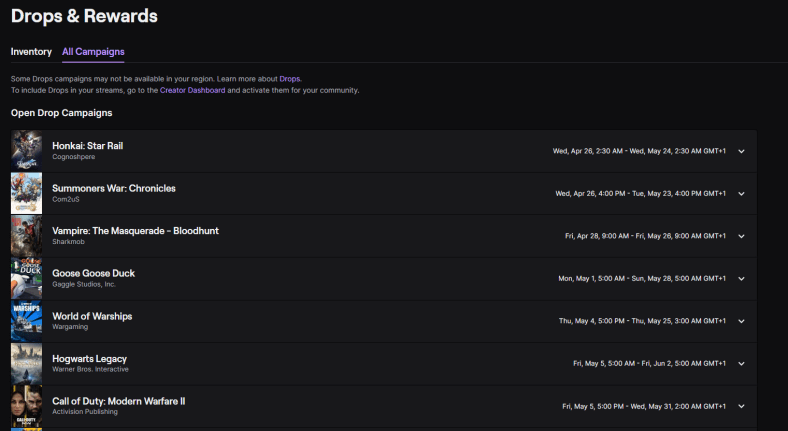
Twitch Drops are a promotional feature that allows game developers and publishers to offer rewards to viewers who watch specific streams on Twitch. These rewards can range from in-game items, currency, skins, or even access to exclusive betas or early releases. Twitch Drops are known as one of the best ways to reward and engage the community in watching the stream of their favorite gamers. Apart from this, it also promotes games and fostering collaborations between streamers and developers.
How do Twitch Drops work?
To participate in Twitch Drops, viewers must link their Twitch account with the corresponding gaming platforms account such as Steam, Xbox, or PlayStation). Once the accounts are linked, viewers can tune into streams designated as “Drops enabled” to become eligible for rewards. Drops are typically awarded randomly or based on specific milestones reached during the stream, such as watching for a certain duration or achieving in-game accomplishments. However, it is also possible for mobile gamers today to stream their game. There are millions of mobile gamers who get a chance to show their gameplay on this platform.
Maximizing Your Chances of Earning Drops
- Research Drops-Enabled Streams
Stay informed about Drops-enabled streams by following official announcements from game developers, publishers, and Twitch. Keep an eye out for social media updates, developer blogs, and official Twitch channels. Many game communities also have dedicated forums or Discord servers where Drops events are announced. You can plan your viewing schedule by being aware of Drop’s opportunities.
- Optimize Watch Duration
Some Drops require viewers to watch for a specific duration to become eligible. Be mindful of the required watch time and ensure you meet the criteria. If you’re unable to watch the entire stream, consider leaving it running in the background while you attend to other tasks. However, make sure not to violate Twitch’s guidelines on view botting or engaging in activities that artificially inflate viewership. Violation of their terms and policies will not provide you with your rewards.
- Engage in Chat and Community
Participating in the stream’s chat can increase your chances of receiving Drops. Developers and streamers often reward active chatters or conduct additional chat-based giveaways alongside Drops events. Discuss, ask questions, and share your excitement with the community. However, avoid spamming or violating chat rules, as this can result in being timed out or banned from the channel.
- Enable Notifications
To stay updated on Drops events, enable email or mobile notifications from Twitch, game developers, or streamers you follow. It ensures you receive timely alerts about upcoming Drops opportunities. Twitch’s notification system allows you to customize your preferences to choose which streams or events you want to be notified about.
- Multi-Stream Technique
Consider utilizing the multi-stream technique if multiple streams offer Twitch Drops for the same game. Open several streams simultaneously in different tabs or windows (if your internet bandwidth allows) to increase your chances of earning rewards. Keep in mind that you’ll need to meet the required watch time individually on each stream to qualify for Drops.
- Check Your Inventory
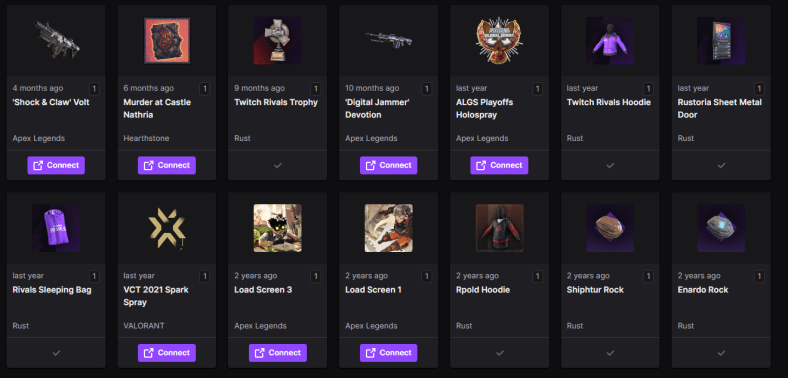
After watching Drops-enabled streams, periodically check your inventory on the respective gaming platform. Some Drops may be automatically added to your account, while others may require manual redemption. Ensure you know the redemption process for each game to claim your earned rewards promptly.
- Stay Positive and Patient
Drop events can generate high viewer traffic, resulting in delays or technical issues. Stay positive and patient if you encounter any hiccups along the way. Remember that Drops are randomly awarded, and earning rewards is not guaranteed. Keep enjoying the content, engage with the community, and appreciate the experience of watching your favorite streamers.
Conclusion
Twitch Drops provide an exciting way for viewers to engage with their favorite streamers and earn exclusive rewards. Get Twitch Drops and employ strategies to maximize your chances, you can enhance your overall Drops experience and potentially unlock valuable in-game content. Keep an eye out for Drops-enabled streams, follow the guidelines set by developers, and enjoy the thrill of earning rewards while enjoying the content on Twitch.


