



Regarding image upscaling, VanceAI Image Upscaler is the best online image upscaling that profoundly enhances your pictures. You can convert any CG image into HD with one click. People face issues while enhancing computer generated images as the AI image upscaler enhances images online for human faces, not other photos. This tool by VanceAI can deal with any image you provide.
What’s the Use of HD CG Pictures?
CG images, also known as computer generated images, are mostly used in making games or cartoons. They are also used in animated movies. They are mainly used on this platform. You can also use it as an image for your wallpaper if you are a fan of cartoons. Here are the benefits of HD CG images
Benefits and Uses of HD CG Images
Well, quality matters even if you talk about any image. The quality also matters when it comes to computer generated. If the details of the cartoon’s quality are intense, it will portray more results. The more prominent the pictures of a comic, the more it catches viewers’ attention. HD CG images provide realistic vision in front of viewers’ eyes, making them more focused on the movie.
The high-definition result, movies, or animated cartoon videos are more well-known due to their graphics.
In comparison, simple-resolution animated movies or cartoons are less appealing and need to be better known. Technology has progressed so far that you can now watch movies on virtual and augmented reality devices. Quality matters the most to connect the viewer’s emotions with the cartoon. If you provide enough details that match the requirement of HD, then you can get more views easily.
Here are some uses where CG graphics are compulsory with HD quality.
- Printed media requires HD CG images.
- Various video games are based on HD CG videos.
- Television ads or commercials use HD CG graphics.
- Modern gaming consists of HD CG animations.
How Can VanceAI Image Upscaler Help?

The main requirement of CG images is quality. The well-detailed and organized quality ranks the CG world. VanceAI Image Upscaler consists of an AI upscale image that enhances the details from the inside. Viewers will pay attention to the series if the animation’s visuals are excellent. All the video games made until now as the technology is improving working on the graphics. Why is the quality of the visuals improving day by day?
People love those games with good quality graphics more than those with low resolution. Nowadays, no one plays games or watches any animation that is of low quality. The image upscaler main aim is to boost the image features. You can intensify the effects of your CG animation with the help of an AI upscale image. You can instantly upscale your image without quality loss and effort. Just upload any image that you want to upscale. Even if it relates to anything, the image upscaler will enhance the image instantly with one click.
An upscale image can make things more complex by adding more details to your pictures with a few swift moves. It is a very easy-to-operate platform that can automatically enhance your picture immediately. You don’t have to worry about anything related to quality as the image upscaler tools is tested on millions of images to provide an authentic result with fast speed.
Guide to Use VanceAI Image Upscaler
If you want to upscale an image online with VanceAI Image Upscaler then you can follow the given methods. A complete proper step-by-step guide is given below. Make sure to read it carefully so that you can operate it without effort.
Method 1: Go to Image Upscaler Product Page
First of all, you would have to open the official webpage of VanceAI. Then click on the option of products at the top of the page. Then various tools will be opened in front of you. Click on the image upscaler tool and open the page.
Step 1

After opening the official product page for image enhancement, you can scroll down to get info about the performance and features of the tool. If you want to begin your work, then click on the upload image option. Please select the required image from your device and upload it to the platform. You can also try another method if it suits you. Drag the required image from your device and pin it on the webpage to upload the image directly.
Step 2
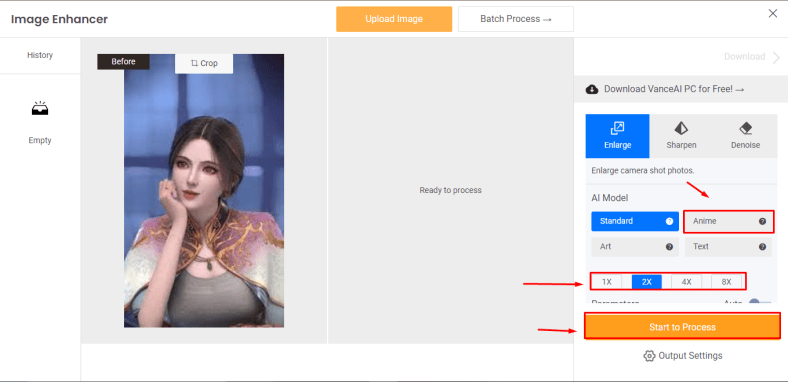
After uploading the image, your image will be displayed on the left side, and its left side will be empty, as the enhanced photograph will be shown there. As we enhance images for computer generated, you will have to select the anime option. Select the required scale of enhancement 2x to 8x available. It depends on your choice; after completing the setting required for editing, click on start to process to begin image enhancement.
Step 3

Your image will be processed within 5 seconds of the time duration maximum. Your uploaded image and the enhanced image will be displayed side by side to provide an overview of performance. You can download the image to your device easily. Click on the download image option and download it to your device.
Method 2: Visit VanceAI Upscaler Workspace to Process Image

You can also use an alternative that provides the same features as the product page. Visit VanceAI Upscaler Workspace to enhance CG images online without effort. You must simply upload an image and complete the whole image enhancement process within three simple steps. It is also based on automated tools that require no effort from its users. It consumes less internet speed during the opening as it does not have fancy pictures with information like the product page.
About VanceAI
VanceAI is an online platform that provides various services related to image editing. It provides AI tools that can edit your images without effort. All you have to do is sit back, and with a few clicks, you can perform all editing activities with your finger clicks. An easily accessible platform that can reduce stress during the image editing process by automatically performing all complex tasks. You can further improve the quality of your image with these two important tools that VanceAI provides.
VanceAI Image Sharpener
You can make your images more HDR with the help of an image sharpener. Unblur the image and awaken the details of your image instantly. It can eliminate all sorts of blurriness from your image like a pro.
VanceAI Image Denoiser
An automated tool that instantly removes all sorts of noise from your image. Get rid of the noisy images with a few simple clicks effortlessly.
Conclusion
With all the given information above, VanceAI provides tools that are easy to deal with. If you hire any professional to perform the same activities, he will take more than hours to complete the task. Why do you need to hire someone when you can perform those tasks at your home? Most importantly, it doesn’t matter if you have any experience. Anyone with zero skills can edit images like a pro.
FAQs
1. What is VanceAI PC?
VanceAI PC is an application you can download on your PC and perform image editing with the help of AI tools. All the tools are available on your pc. You can operate it anywhere and at any time.
2. What is VanceAI Photo Restorer?
You can restore your image with the help of VanceAI photo restorer. It can instantly restore all types of old image details and convert them into a new fresh image online with one click.


