



Got an important file on your Android phone but are unable to get it on your Mac using a simple USB connection? This article is here to help you transfer files from Android to Mac effortlessly.
Unlike Windows PCs, Mac does not allow connecting Android and uploading or downloading files using a USB cable. Security is one of the reasons.
Some third-party applications let you sync up the Android phone with your Mac so you can transfer files between these devices. However, you must choose wisely, or you will end up getting one that instead of making you productive does the opposite. Find below the best apps for Android file transfer on Mac to stay organized and productive.
MacDroid
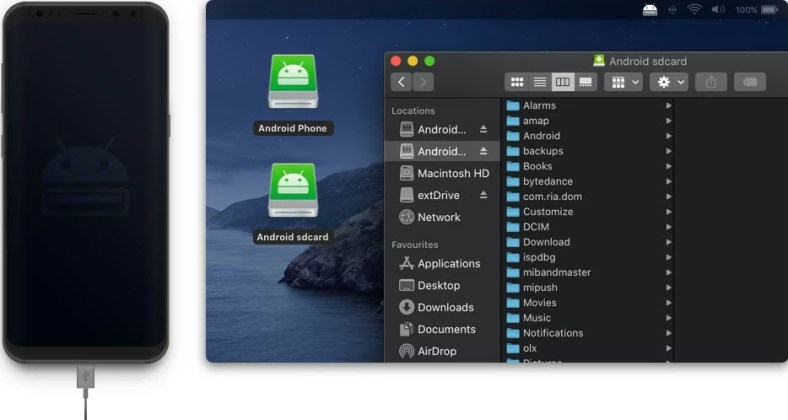
MacDroid is one of the best applications to transfer files from Android to Mac. With the Pro edition, you can also send files to your Android smartphone and tablet from the Mac. The tool is useful to transfer all file types like photos, videos, music, documents, etc., between these devices.
Furthermore, the app lets you edit the content of your Android smartphone in its internal storage without moving the files to Mac. The app comes with both the MTP and ADB modes. The MTP allows usual file transfer and ADB facilitates Android debugging and app development on Mac.
Moreover, the app is available for free for single-direction file sharing, which is Android to Mac. But if you are looking for bi-directional file transfer along with regular updates, you might want to go for the Pro edition.
SyncMate

SyncMate is a trending device and service syncing app for Mac. When you work on multiple Android and iOs devices throughout the day and want to sync all the work or personal data to your main Mac device, you should use SyncMate. This super-intelligent tool ensures that all your work and personal files are on one device. Not to mention, you create automatic backups of smartphones and tablets when using SyncMate.
Its Devices Sync feature enables you to connect almost every device to Mac at your home or the workplace and sync data up to the latest checkpoints. Devices supported are iPhone, iPad, iPod, Android, Samsung, LG, Google, Macbook, iMac, devices with MTP protocol, mass storage devices, and so on.
If you work on cloud data like documents, files, images, codes, etc., stored on Google Drive, Dropbox, and Microsoft Office 365, you can use the Cloud services sync feature.
From your Android devices, SyncMate can sync the following data and services: Contacts, Calendars, Music and playlists, Photos and videos, SMS sync, Folders, Bookmarks, and Call history.
In the Free edition, you get basic services like Contacts and Calendar sync. When you upgrade to Expert, all the application functionalities become accessible.
Android File Transfer

Android File Transfer is a proprietary app from Google. It enables MTP-based connectivity between your Mac and Android smartphone or tablet using a compatible USB cable. You can browse the internal storage of the connected phone and move files to the Mac. It does not let you connect to Mac and Android using wireless technologies like Wi-Fi and Bluetooth. The tool is free. However, you may face difficulties reaching out to any support services.
Google Drive

You can also use your Google Drive account to transfer files from Android to Mac or Mac to Android. To accomplish this, you must install Google Drive on both devices. You will also need to log in to the same Google account on Android and Mac.
Once set up appropriately, you must use the Google Drive mobile app to upload files from the smartphone to a dedicated folder. Then, access the same folder from Mac.
Using an Email Client

You can also use any email client like Gmail, Yahoo Mail, Outlook, AOL, etc., to send Android files to Mac. The process is highly manual and time-consuming. You must use the small screen of Android to attach files to emails carefully or you might end up sending the wrong files. However, the common problems with the email-based approach are as follows:
- Allows sharing small files up to 25 MB only
- Prohibits sharing EXE, PKG, APK, or DMG files
- Finding the right file to share is challenging
Conclusion
So far, you learned five methods to transfer the files from your Android device to a Mac and vice versa. Using an email app and cloud storage like Google Drive are free but primitive methods. You do not get enough automation, productivity, and convenience since these methods are highly manual.
You can also try the Android File Transfer app from Google but it comes with limited features.
The best option you should definitely try out are the MacDroid and SyncMate. These apps offer quickie device sync, faster upload and download speeds, and a dual-panel file manager which is native to Mac.


