



Entering the field of video production might sound intimidating at first, but artificial intelligence software is making it easy. You can easily make a compelling video out of a still image within a matter of minutes. The trend is fast developing, and more and more people are using AI to produce content.
This article will take you through the Image to Video AI. Let’s get an update on the basics and start creating your own videos from static images in no time.
Learning the Rundown of Image to Video AI
Image to Video AI applies machine learning processes that transform static images into moving images, injecting motion and significance into static pictures otherwise. These tools learn an image’s content—such as landscapes, faces, or objects—and produce short video segments through imitating camera pan or object manipulation.
With massive image and video databases, the AI is trained to learn how different parts of an image typically move and interact with each other. This allows it to build intelligent short videos. Short videos built are a new way of introducing visual interest and storytelling through dynamics that are organic and meaning-relevant to the initial photo.
Why Beginners Should Embrace Image to Video AI
1. No Technical Expertise Required
AI Video Generator enables simple social media videos and campaign creations for a broad spectrum of users such as small business owners, hobbyists, and content creators. This includes the real-time conversion of plain images like photo collage into powerful promotional videos.
Platforms come with user-friendly interfaces that simplify video making. Rather than using keyframes or timelines, new content creators simply upload an image, select a style, and the AI does the rest.
2. Enhanced Creativity and Engagement
Image to Video AI opens up more creative doors. It enables the production of more interesting and distinctive videos that more effectively engage the attention of viewers.
3. Cost‑Effective Experimentation
AI Video Generator has low-cost or even free plans, allowing creators to try out different styles and templates without sinking huge sums into it. Such autonomy encourages experimentation and quick learning. AI reduces time and effort spent in creating a video, eliminating the need for manual editing and the typically steep learning curve of high-end software.
Dreamlux Image to Video AI: Advanced Tool You Should Try
Dreamlux is an innovative online platform that specializes in AI‑driven video generation. It offers two core services:
- Text to Video AI: Converts written prompts into engaging video content by identifying key themes and generating matching visuals.
- Image to Video AI: Animates static photos into lifelike videos, ideal for marketing, social media, or personal projects.
Both services produce high-quality, watermark-free videos quickly, making Dreamlux accessible to users at any skill level.
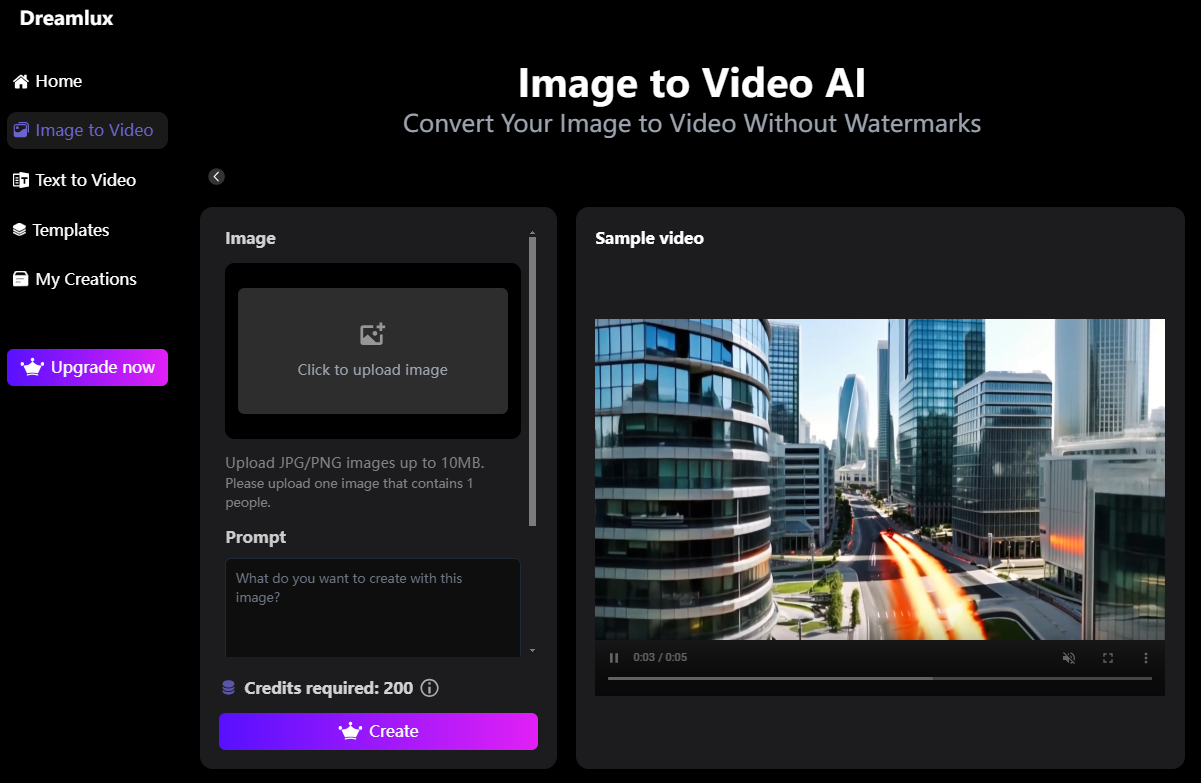
Getting Started with Dreamlux Image to Video AI
Step 1: Sign Up and Choose Your Service
Create a free Dreamlux account and navigate to the Image to Video AI section.
Step 2: Upload Your Image
Select a high‑resolution photo (1080p or higher) for best results. The AI analyzes facial expressions, object placement, and background details to plan the animation.
Step 3: Enter the prompt
After uploading, type a detailed text prompt describing the motion, style, and mood you want. For example, “Create a gentle parallax zoom with soft lighting, focusing on the subject’s face as it subtly shifts forward.” The AI uses your prompt to generate a tailored animation that matches your vision.
Step 4: Render and Download
Click “Create,” and Dreamlux’s fast cloud rendering engine creates your video in minutes. Download the final clip without any watermark, even on the free tier.
Key Features That Empower Beginners
- Easy‑to‑Use Interface: Drag‑and‑drop simplicity equals no hills to climb.
- Rich Library of Templates: Access romance, corporate, cinematic, and social‑media‑friendly styles to suit any tale.
- High‑Quality Outputs: cutting‑edge AI algorithms yield videos that look pro, with smooth transitions and natural motion.
- No Watermark: Preserve clean, brandable videos for yourself or client use—no unexpected fees for watermark removal.
- Cloud‑Based Rendering: Fast rendering without clogging your local machine.
Practical Tips for Beginners
- Start Small: Use short clips to familiarize yourself with the tool’s capabilities.
- High‑Resolution Source: The clearer your original image, the better the AI’s animation quality.
- Experiment with Templates: Don’t settle on the first effect—test different styles to find what resonates.
- Plan Your Story: Even simple animations benefit from a clear narrative—think about the beginning, middle, and end of your clip.
Conclusion
Image to Video AI is revolutionizing the way video beginners create, removing tech obstacles and enabling fast, amazing results. With Dreamlux Image to Video AI service, high‑quality and watermark‑free video creation is accessible to everyone.
Whether you are a marketer, social media frenzy, or hobbyist, Dreamlux offers you the artistic freedom and timeliness you need to breathe life into your static images. Ready to make your photos compelling videos? Start for free today!


